

In brief
Appointments, reservations and scheduling, online and automated. A step-by-step guide to building a booking system that saves you hours every day.

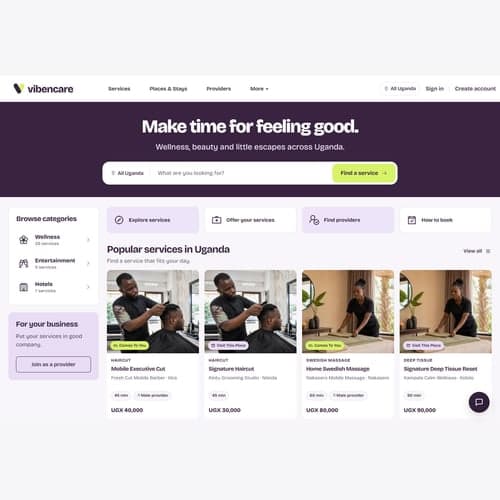
If your business takes appointments (salon, clinic, consultant, restaurant, school) an online booking system can save you hours every day and give your customers the convenience they expect. Here is how to build one.
What an online booking system should do
- Let customers book 24/7: without calling or messaging you
- Show real-time availability: so customers pick an open slot
- Send automatic confirmations: via WhatsApp, SMS or email
- Send reminders: reduce no-shows automatically
- Sync with your calendar: so you never double-book
- Accept payments: deposits or full payment at the time of booking
Build vs buy: what is right for you?
| Option | Cost | Best for |
|---|---|---|
| Use existing platform (Calendly, Booksy) | Free – UGX 100K/month | Individuals, simple bookings |
| WordPress plugin | UGX 500K–2M | Small businesses with existing WordPress sites |
| Custom-built booking system | UGX 3M–8M | Businesses needing custom workflows, integrations |
| Full web application with booking | UGX 5M+ | Multi-location, complex scheduling, payments |
What a custom booking system can do that off-the-shelf cannot
- Integrate directly with your existing website or app
- Match your exact branding and user experience
- Handle complex scheduling (multiple staff, services, rooms)
- Integrate with local payment methods (MoMo, Airtel Money)
- Send WhatsApp notifications (critical for Uganda)
- Collect custom information during booking
- Generate business-specific reports
The development process
- Requirements gathering: What do you book? Who can book? What rules apply?
- Design: Customer-facing interface and your admin dashboard
- Development: Backend (Laravel), frontend (React), database and integrations
- Testing: Real scenarios with real devices
- Launch and training: Go live, train your team
- Ongoing support: Optional maintenance for updates and fixes
How long does it take?
A custom booking system typically takes 3–6 weeks from design to launch. More complex systems with payment integration and multi-location support may take 6–10 weeks.